Fun with IPX Errors and Next.js Plugin Issues on Netlify...


> Click here to jump straight to the solution <
Late last year, probably sometime after October of 2025, I started noticing some odd image errors during build time when I was pushing updates to this blog.
Truth is I’ve been very hands off with respect to this blog for over a year now, as I’ve been really busy with work, but the build errors had me worried and stumped. I didn’t have the time to look into what the actual issue was though, so I just reverted to previous deployments, telling myself I’d follow up when I had a chance.
Well, that chance didn’t really come, until all of a sudden I happened to notice none of the dynamically loaded images on this site were working. I don’t know when the images stopped loading as I hadn’t checked up on the site in quite some time, but I obviously had no choice now but to see what the frick was going on!
The initial error I was now seeing with the images was slightly unrelated to the real issue, but after pushing a quick update to sync my node version to the one Netlify is now supporting, those pesky errors I was seeing last year showed back up again.
The Issue
When trying to load or open any dynamically loaded image, I was seeing this:
IPX Error: Something went wrong installing the "sharp" module

libvips-cpp.so.42: cannot open shared object file: No such file or directory
Now, I don’t know much about IPX, other than it’s what Netlify was previously using for the next/image component image optimization, but as I’m using an older version of Next.js, and have no desire/reason to move this blog to Next.js 15+, I assumed it’s what had to be used.
And of course everything was working fine locally. It was only occuring in production, and re-deploying with no cache didn’t help.
Perfect. 😒
First Thought: Sharp is Broken?
Naturally, I assumed the issue was with sharp, since the error literally says so.
I did a bit of searching on the Netlify forums, and based on one thread I saw, tried replacing the sharp package with sharp-wasm32 and deployed the site again…
Same error.
That should have been my first clue that sharp wasn’t actually the problem.
Second Thought: Netlify Runtime?
Something I had been seeing in my build logs for some time was a warning about the Next.js plugin being used during build time:
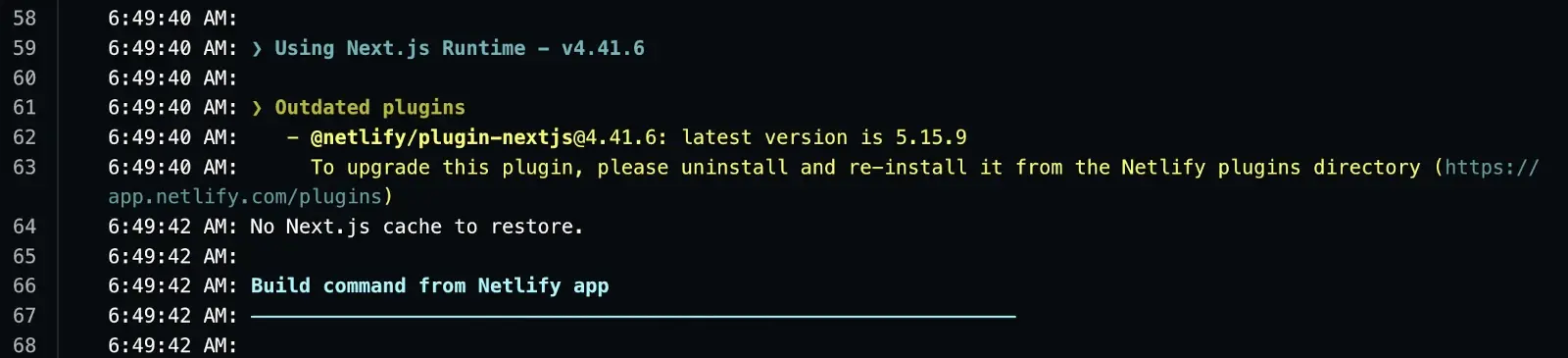
So basically, the plugin being applied during my builds was v4.41.6, but the current version is 5.15.9. The build was working though despite the older version being used, so I wasn’t sure if it was an issue or not.
I did a bit more digging on the Netlify forums, but couldn’t really find anything that helped, so I tried Netlify’s AI answer bot. It made a few suggestions, including that I remove the Netlify Next.js plugin from my package.json - but I never added it as a dependency to begin with so I knew that wasn’t the issue. I tried removing the plugin I saw in my build settings though:
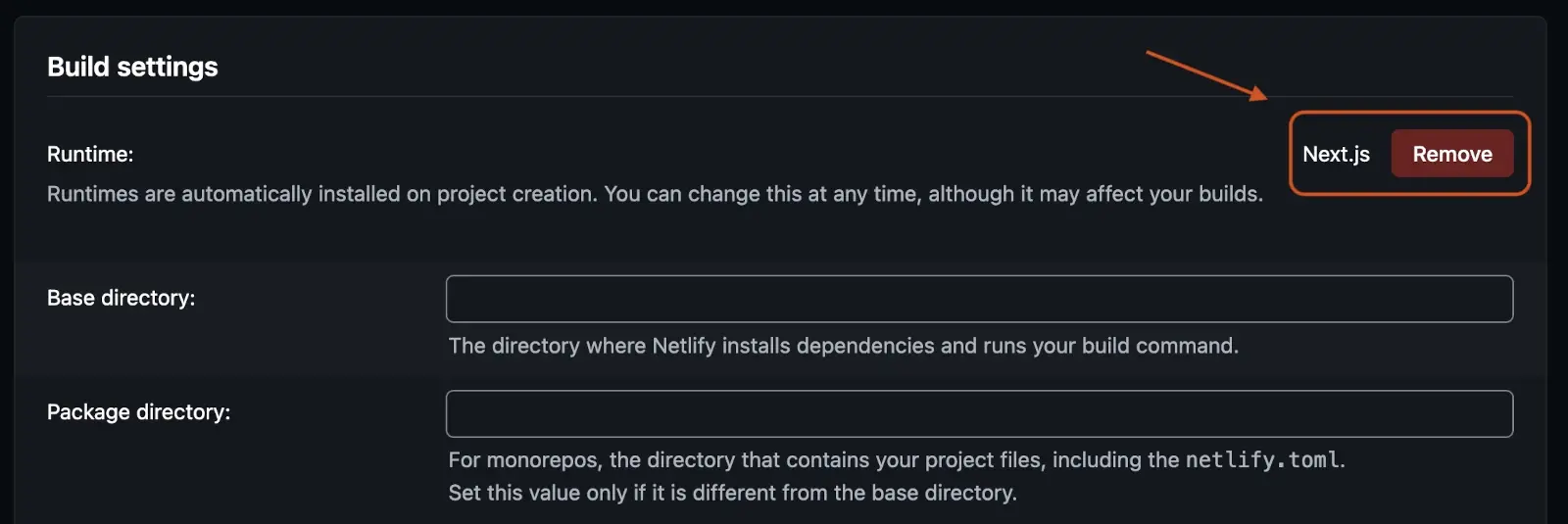
But as I suspected, it’s there for a reason. And while I was able to successfully re-deploy without any errors after removing the plugin, without the plugin the build process produces a static export, so my site was simply throwing a 404 for any page I tried to access.
So I re-added the plugin, re-deployed, and after some other suggestions from Netlify’s ASK bot that didn’t do anything, the bot suggested I open a ticket with support. And so I did.
Third Thought: Contact Support
The initial several responses I received from support were to remove the Next.js runtime/plugin in my package.json, which as I noted before, I don’t have.
I had already stated that I didn’t have the plugin pinned in my dependencies, and also that I had previously removed it from my build settings to no avail, but apparently that was ignored, as that was all they kept suggesting they could do from their end. So I figured, what the heck - let’s give this a try.
So they removed the plugin, I re-deployed, and as expected it simply took down my entire site as it had before.
Sigh.
Ok, so let’s re-asses - At this point:
- Images were broken with Next.js runtime enabled
- My entire damn site was broken without the runtime
Awesome.
Fourth Thought: Dependencies
I started looking more closely at my build logs, and based on some of the output thought maybe it was time to update some packages. I had been working with an older version of Node.js locally in dev, was using an older version of Yarn, and many of my dependencies had since been updated.
So I ran a bunch of yarn up’s, as well as some yarn add’s and yarn remove’s to take care of some babel and eslint warnings, cleared out my Yarn cache, then git committed and pushed to trigger a fresh deploy, and… Same shit as before.
Cool.
Cool cool cool. 🙄
Final Step: Bring in the AI Guns!
Ok, so at this point my site hasn’t been loading images for possibly several months and:
- Netlify’s ASK Bot couldn’t help
- Netlify’s forums didn’t have anything relevant
- Netlify support wasn’t much help
- My feeble attempts at synching and updating dependencies had proved fruitless
- Search engines had nothing about the IPX errors I was still getting
So I figured why not paste my build logs into ChatGPT, explain the scenario, and see if it could pinpoint anything.
ChatGPT immediately singled out some package issues:
The main issue is that your dependency graph is internally
inconsistent in a few places, and one of those inconsistencies
is very likely keeping Netlify on an image path you do not actually want.

What stands out:

next is pinned to ^14.0.4, but your build is actually using Next 14.2.35.
That is normal semver behavior, but it means you are not debugging
against 14.0.4 anymore. Meanwhile, you have react and react-dom at 19.2.4,
which Next 14 does not officially line up with. React 19 support arrived
in the Next 15 cycle, with stable React 19 support called out in Next 15.1.

You also have eslint-config-next at 12.1.0, which is far older than your
Next version. That is not the kind of mismatch that usually causes the image
runtime failure by itself, but it is another sign the project has drifted
across major versions and may be pulling in assumptions from multiple Next
eras at once. The build warning about peer mismatches fits that pattern.

Your own logs show Netlify detecting framework next at 14.0.4, then the
build banner shows Next.js 14.2.35, and Yarn warns that your React versions
do not satisfy what Next expects. That is not a clean install state.
Fair enough. I pretty much already knew what ChatGPT was pointing out, but what stood out to me was that my project wasn’t in a clean install state.
It then suggested I:
1. Clean up the version matrix.
and
stay on Next 14 and downgrade React:
next: pin to 14.2.35
react: 18.2.0
react-dom: 18.2.0
eslint-config-next: 14.2.35
Makes sense. So I followed ChatGPT’s suggestions and triggered another deploy and Yurika!
It finally passed the error I was getting with the old outdated Next.js plugin and was finally using the current plugin version!
Oh wait…
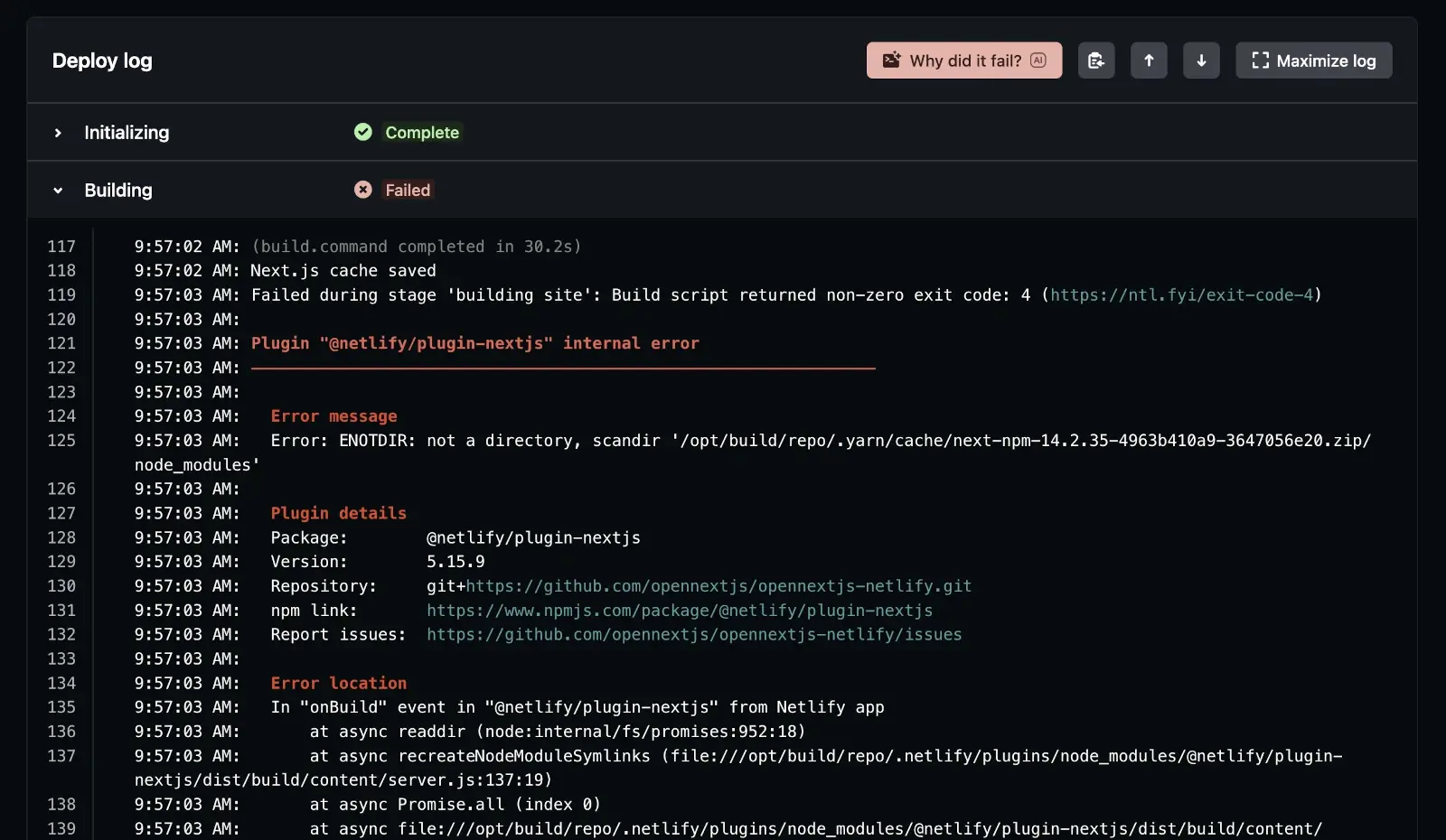
So the previous errors I was getting were now fixed - that’s good right? But now the plugin was barfing on my yarn cache. The key lines being:
@netlify/plugin-nextjs internal error
and
ENOTDIR: not a directory, scandir '.yarn/cache/...zip/node_modules'
The error was, of course, obvious… I’m using Yarn’s PnP system, which I absolutely love, but Netlify’s build system is trying to read the zipped PnP packages as if they were directories. What the fork?
So I went back to support, but they simply advised me that Yarn’s PnP isn’t supported, without answering my question as to why the new plugin doesn’t support PnP.
I know it was supported before in the older plugin versions, but I also know Yarn PnP isn’t well supported in a lot of tools. I’ve run into issues in the past when I was trying to use typescript and tailwind in VS Code, and I’ve also had to code specific work-arounds in some projects on Netlify because PnP messes with the way edge functions work.
But now my entire site wouldn’t run if I continued with PnP. So, what do?? 🤔
Thankfully, Yarn supports overrides, either in its .yarnrc.yml file or as env vars, to allow changing the build behaviour.
So I added a YARN_NODE_LINKER env var set to “node-modules” in my Netlify build settings for my blog, and finally my site was building without errors, and most importantly… images are finally loading on my site again!
Final-frikin-ly. 😮💨
The Actual Solution
Ok, so first off, I realize my situation might be one-off. There probably aren’t many in the exact same situation that I was in, but the main issues I had were:
- IPX image errors causing my site’s images to fail to load.
- Netlify building my site with a defunct version of their Next.js plugin.
- Lack of Yarn PnP support causing further issues with their current version Next.js plugin.
So if you’re in the same boat as I’m in, where you’re still on Next.js v14 or older, and are seeing IPX image errors, try the following:
Steps to correct IPX image loading errors on Netlify
Step 1: Align your dependencies
- Pin your Next.js version to 14.2.35 in your
package.json. - Make sure
reactandreact-domare in a sub-v19 branch, ex:18.2.0. - Check if your eslint needs updating.
These steps should hopefully allow Netlify’s latest Next.js plugin to work with your build process.
Step 2: Set your prod dependency system (optional)
Additionally, if you are using Yarn’s PnP dependency system, while you can continue to use it in your local dev, you’ll need to disable it in the prod build, either by adding the following line to your .yarnrc.yml:
nodeLinker: ${YARN_LINKER_MODE:-pnp}
or setting an environment variable in your Netlify build settings:
- In Netlify, go to Site settings → Build & deploy → Environment variables.
- Add the following key and value:
YARN_NODE_LINKER=node-modules
This tells Yarn:
“Use node_modules ONLY in the prod environment”
See Yarn’s settings doc for full details.
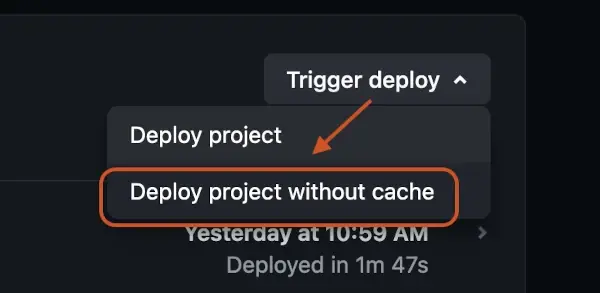
Step 3: Deploy with a CLEAN Netlify cache
This is important - If you skip this step, Netlify may reuse the old PnP install or settings.
Go to:
- Deploys tab
- Trigger deploy → Deploy project without cache
Final Thoughts
This was one of those bugs where:
- The error message is misleading (
sharp) - The fix you find online doesn’t apply (
sharp-wasm) - The real issue is buried 3 layers deep (Netlify plugin + Yarn PnP)
And of course… it only happens in production.
So if you’re running:
- Next.js prior to v15 on Netlify
- Yarn 3/4 with PnP
…and you suddenly start seeing:
- IPX errors
- sharp/libvips errors
- random ENOTDIR build failures
Check your linker setup first.
You might save yourself a few hours of pain.
Or in my case… a few days. 😑
Until next time,
michael 😀
Share this post:

Google Apps Script: 2 Caching Methods You Need to Use!

Google Sheets: Use Built-in Functions to Fetch JSON API Data

Using LAMBDAs in Google Sheets to Create Filler Data

In a World with AI, Where Will the Future of Developers Lie?

Odd Behaviour with Alternating Colors in Google Sheets

How to Redirect URLs with Netlify

Is Hosting on Netlify Going to Bankrupt you?

Develop Google Apps Script Code in Your Local Code Editor

Create an Investment Gain Forecaster using Google Sheets

Limit the Number of Pre-rendered Pages in Next.js

Understanding PostgreSQL RLS, and When to Use it

Build a Weather Widget Using Next.js

Filtering Data in Google Spreadsheets

5 Ways to Redirect URLs in Next.JS

Create a Budget Tool with Google Sheets

Fix Path Name Mismatches in Local & Remote Git Repos

Fix "Cannot find module ..." TypeScript errors in VS Code

Fix "Unknown at rule @tailwind" errors in VS Code

Build a Simple Contact Form with Next.JS and Netlify

Fix "Hydration failed ..." Errors in React

Updating Turborepo to use Yarn Berry

The Pros and Cons of Using a Monorepo

Git Cheat Sheet

Create an Expense-tracker with Google Sheets - Part 2

Create an Expense tracker with Google Sheets - Part 1

Quick and Dirty Portfolio Tracker Part 2 - Crypto

Quick and Dirty Portfolio Tracker Part 1 - Stocks
Comments